WooCommerce商城产品描述设置可以通过在子主题的functions.php文件中添加自定义代码实现。直接从外观-主题文件编辑器访问文件-从右侧边栏定位子主题的 functions.php,也可以从主题的目录文件访问它,并在functions.php插入以下代码片段。
如果商家经营着销售各种款式连帽衫的网店,可以考虑直接在商店页面分享重要的连帽衫信息。这样顾客无需点击单独的产品页面,就能了解每件连帽衫的独特特色,使购物更加轻松。此外在不同地方展示描述也有助于客户快速获取相关信息。
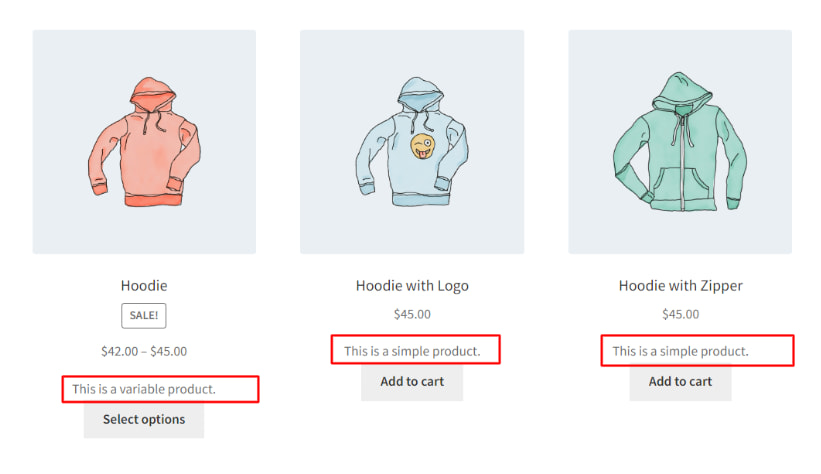
1、使用场景: 在WooCommerce中加入购物车/选择选项将描述显示在上方
下面提供的代码片段会显示在商店页面上,位于“加入购物车”按钮上方的简短描述。将代码片段中woocommerce_after_shop_loop_item钩子的优先级设置为5时,可以在“加入购物车”按钮上方显示简短描述。
add_action( 'woocommerce_after_shop_loop_item', 'ts_show_excerpt_shop_page', 5 );
function ts_show_excerpt_shop_page() {
global $product;

echo $product->post->post_excerpt;
}
2、使用场景:在WooCommerce加到购物车/选择选项将描述显示在下方
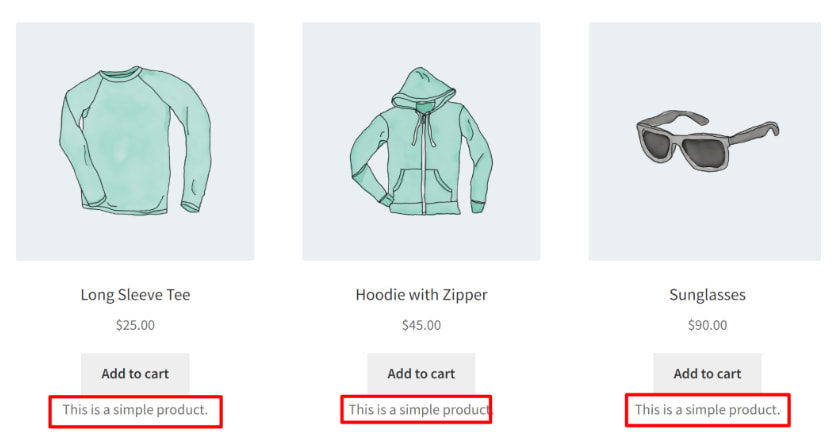
使用此代码片段,每个产品的简短描述将显示在商店页面上的“添加到购物车”按钮下方。通过将代码段中woocommerce_after_shop_loop_item钩子的优先级调整为10,可以在“添加到购物车”按钮下方显示描述。
// Add product short descriptions to the Shop page
function ts_display_short_description_on_shop_page() {
global $product;

// Check if we are on the Shop page
if (is_shop()) {
// Retrieve and display the product short description
$short_description = $product->get_short_description();
if (!empty($short_description)) {
echo '<div class="product-short-description">' . $short_description . '</div>';
}
}
}
add_action('woocommerce_after_shop_loop_item', 'ts_display_short_description_on_shop_page', 10);
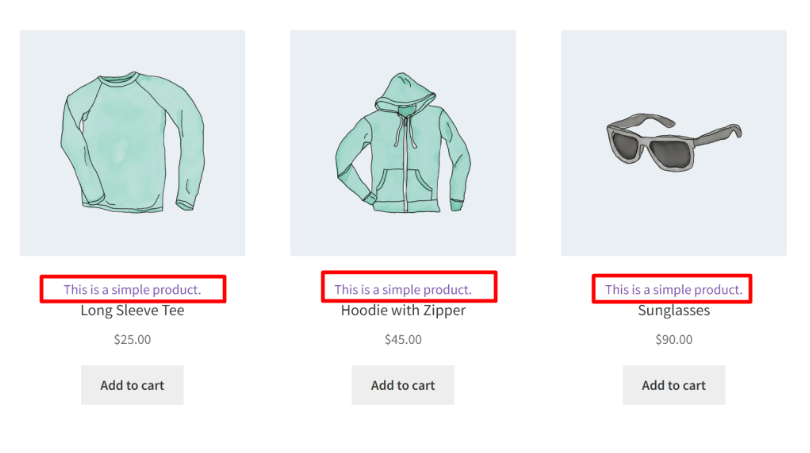
3、使用场景:在WooCommerce中产品标题上方显示描述
要在“商店”页面上的产品标题上方显示产品描述,可以使用woocommerce_before_Shop_loop_item_title钩子,以下是此操作的代码片段:
// Display product's short description above the product title on Shop page
function ts_display_short_description_above_title() {
global $product;

// Check if we are on the Shop page
if (is_shop()) {
// Retrieve and display the product's short description
$short_description = $product->get_short_description();
if (!empty($short_description)) {
echo '<div class="product-short-description">' . $short_description . '</div>';
}
}
}
add_action('woocommerce_before_shop_loop_item_title', 'ts_display_short_description_above_title');
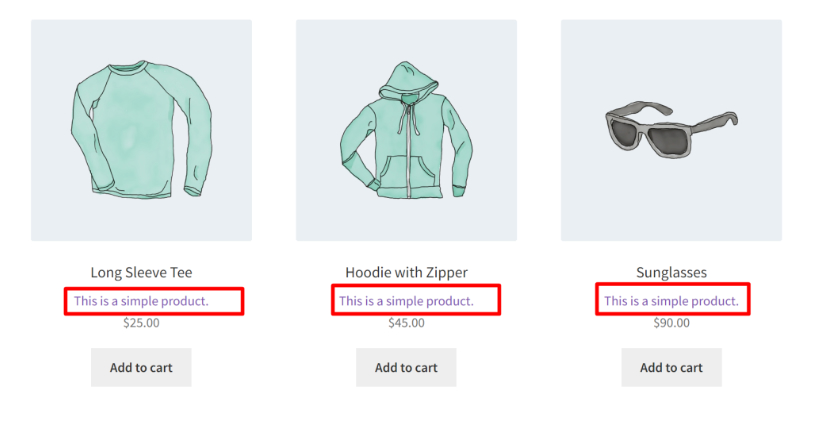
4、使用场景:在WooCommerce 标题和价格之间显示产品描述
要在商店页面上显示产品标题和价格之间的产品简短描述,可以使用woocommerce_shop_loop_item_title钩子,以下是此操作的代码片段:
// Display product's short description between title and price on Shop page
function ts_display_short_description_between_title_and_price() {
global $product;

// Check if we are on the Shop page
if (is_shop()) {
// Retrieve and display the product's short description
$short_description = $product->get_short_description();
if (!empty($short_description)) {
echo '<div class="product-short-description">' . $short_description . '</div>';
}
}
}

add_action('woocommerce_shop_loop_item_title', 'ts_display_short_description_between_title_and_price');
5、使用场景:在WooCommerce商店页面显示产品描述
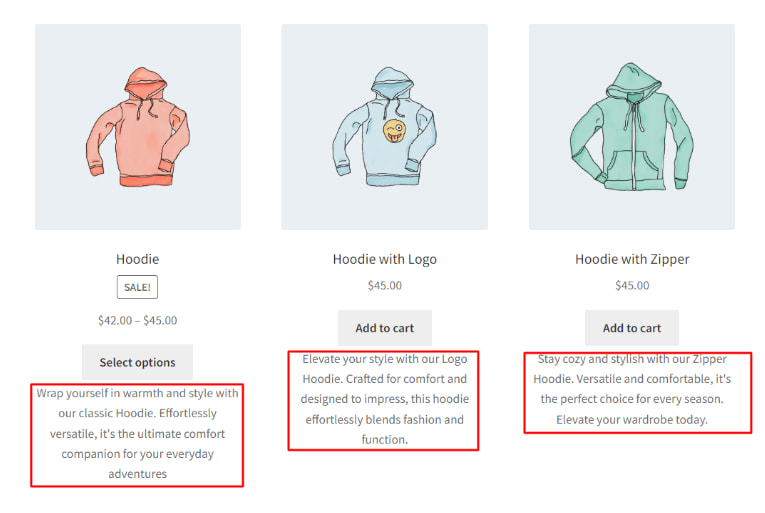
下面提供的代码片段可以显示商店页面上的产品描述。
// Add product descriptions to the Shop page
function ts_display_product_description_on_shop_page() {
global $product;

// Check if we are on the Shop page
if (is_shop()) {
// Retrieve and display the product description
$product_description = $product->get_description();
if (!empty($product_description)) {
echo '<div class="product-description">' . $product_description . '</div>';
}
}
}
add_action('woocommerce_after_shop_loop_item', 'ts_display_product_description_on_shop_page');
推荐阅读:
《WooCommerce建站教程 WooCommerce使用教程》
(本文由美国主机侦探原创,转载请注明出处“美国主机侦探”和原文地址!)

微信扫码加好友进群
主机优惠码及时掌握

QQ群号:164393063
主机优惠发布与交流