腾讯云Coding Plan是为AI Coding场景推出的专属订阅套餐,支持Kimi、MiniMax等多个模型,支持使用OpenClaw、CodeBuddy Code、Claude Code等主流AI工具,助力开发者完成个人项目、学习实践、工具搭建等编码任务。本文主要为大家介绍一下腾讯云Coding Plan购买并接入OpenClaw教程,有需要的朋友可以参考一下。
点击进入:腾讯云官网

一、购买腾讯云Coding Plan
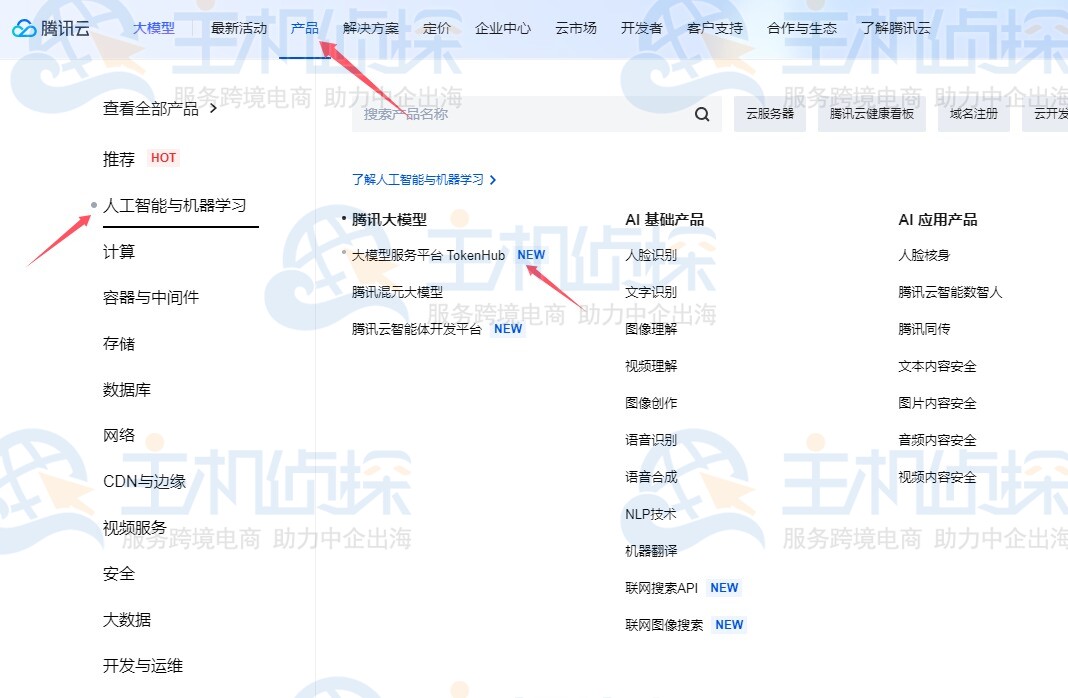
进入腾讯云官网,点击“产品”,选择“人工智能与机器学习”>“大模型服务平台TokenHub”。
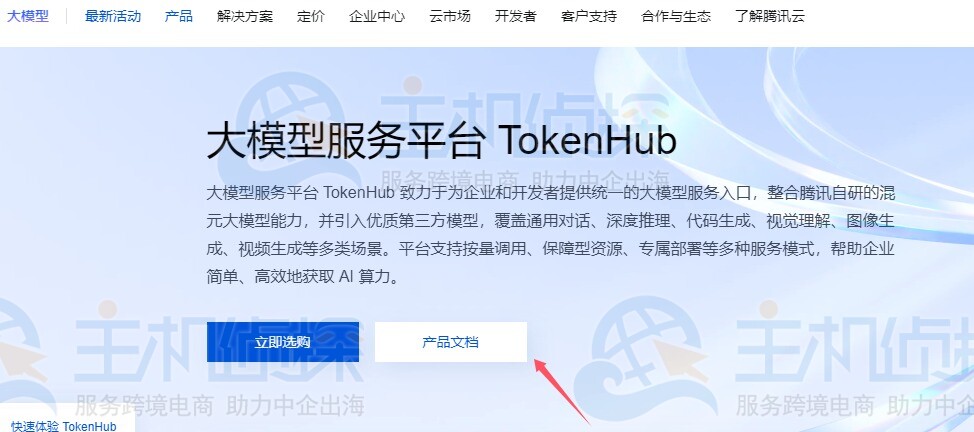
在以下页面,点击“产品文档”,选择“平台功能”,可以找到“Coding Plan”。
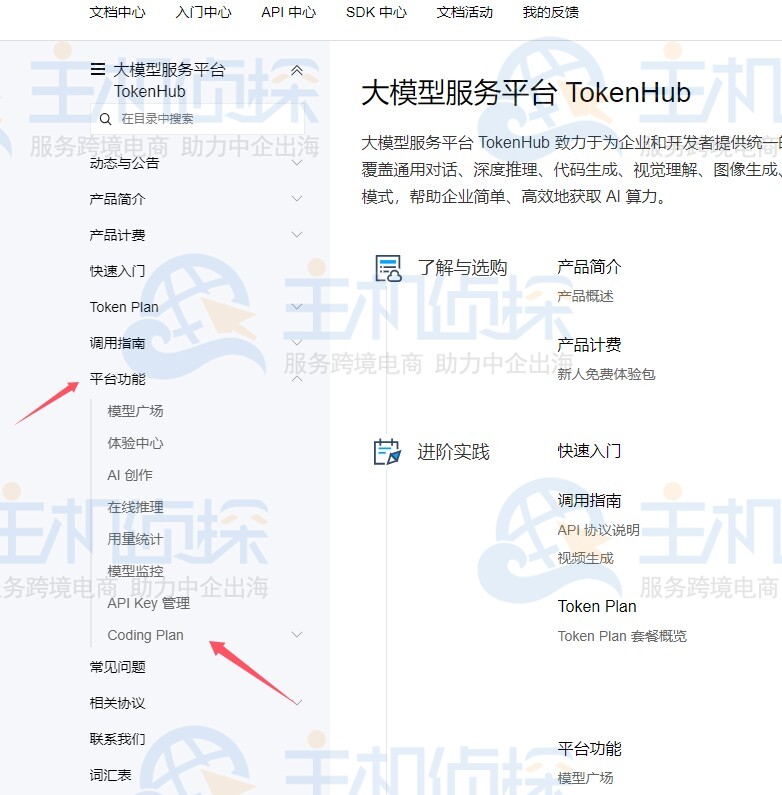
访问Coding Plan页面,根据实际需求选择并购买合适的套餐。
腾讯云Coding Plan方案推荐
| 套餐内容 | Lite 套餐 | Pro 套餐 |
| 价格 | 40元/月 | 200元/月 |
| 用量限制 | 每5小时:最多约1,200次请求 | 每5小时:最多约6,000次请求 |
| 每周:最多约9,000次请求 | 每周:最多约45,000次请求 | |
| 每订阅月:最多约18,000次请求 | 每订阅月:最多约90,000次请求 |
点击购买,付款即可。
二、创建腾讯云Coding Plan专属API Key和Base URL用户在购买了套餐以后,需要获取并在AI工具中配置套餐专属的API Key和Base URL,才能正确使用并抵扣套餐额度。
- API Key:在Coding Plan页面,获取Coding Plan专属API Key(格式为sk-sp-xxxx)。
- Base URL:后续需在AI工具中配置以下其中一个Base URL(因工具而异)。
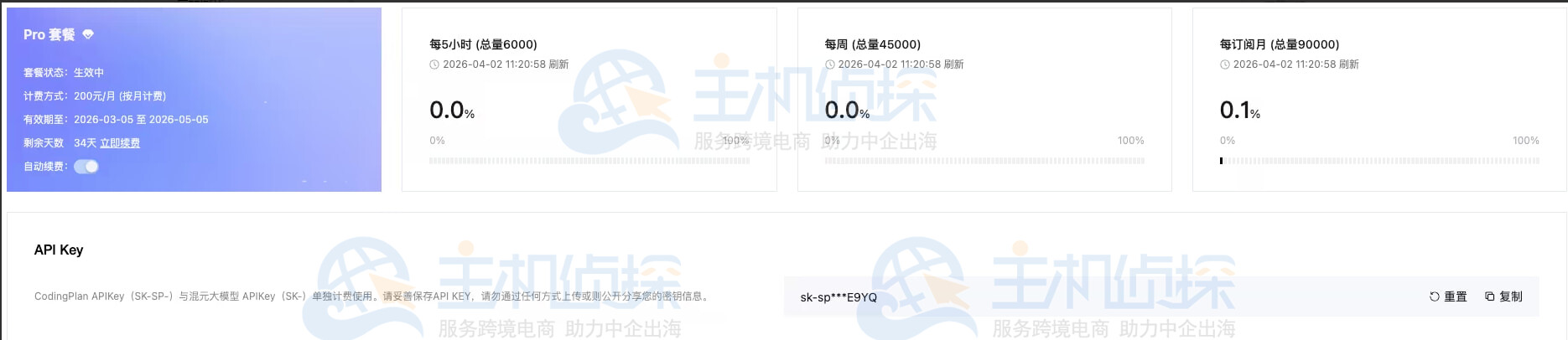
注:Coding Plan专属的API Key和Base URL与腾讯云预付费及后付费的API Key(sk-xxxx)和Base URL(https://api.lkeap.cloud.tencent.com/xxxxx/)不互通,请勿混用。
三、腾讯云Coding Plan接入OpenClawOpenClaw是一款开源的本地AI代理框架,能让AI从“回答问题”进化为“动手执行任务”。它支持在Windows、macOS和Linux上自主运行,通过内置工具和可扩展的插件体系,自动完成文件整理、邮件处理、代码编写等操作。腾讯云Coding Plan支持在OpenClaw中使用,可参考下文进行配置及使用。
1、安装OpenClaw
需要根据实际环境类型,执行对应命令安装OpenClaw。
macOS/Linux:
curl -fsSL https://openclaw.ai/install.sh | bash
Windows:
iwr -useb https://openclaw.ai/install.ps1 | iex
根据提示信息完成OpenClaw配置,参考配置如下。
|
向导配置项
|
配置内容
|
|
I understand this is powerful and inherently risky. Continue?
|
选择 Yes。
|
|
Onboarding mode
|
选择 QuickStart。
|
|
Model/auth provider
|
选择 Skip for now,后续可以配置。
|
|
Filter models by provider
|
选择 All providers。
|
|
Default model
|
使用默认配置。
|
|
Select channel (QuickStart)
|
选择 Skip for now,后续可以配置。
|
|
Configure skills now? (recommended)
|
选择 No,后续可以配置。
|
|
Enable hooks?
|
按空格键选中选项,按回车键进入下一步。
|
|
How do you want to hatch your bot?
|
选择 Hatch in TUI。
|
2、配置Coding Plan
执行以下命令打开OpenClaw的WebUI,然后在WebUI的左侧菜单栏中选择Config>Raw。
openclaw dashboard
在openclaw.json配置项中增加models.providers的配置。
- baseUrl:参考样例,使用Coding Plan兼容OpenAI接口协议的Base URL(https://api.lkeap.cloud.tencent.com/coding/v3)配置。
- <USER_API_KEY>:替换成您自己的API Key。
“models”: {
“mode”: “merge”,
“providers”: {
“tencent-coding-plan”: {
“baseUrl”: “https://api.lkeap.cloud.tencent.com/coding/v3”,
“apiKey”: “<USER_API_KEY>”,
“api”: “openai-completions”,
“models”: [
{
“id”: “tc-code-latest”,
“name”: “Auto”,
“reasoning”: false,
“input”: [“text”],
“cost”: { “input”: 0, “output”: 0, “cacheRead”: 0, “cacheWrite”: 0 },
“contextWindow”: 196608,
“maxTokens”: 32768
},
{
“id”: “hunyuan-2.0-instruct”,
“name”: “Tencent HY 2.0 Instruct”,
“reasoning”: false,
“input”: [“text”],
“cost”: { “input”: 0, “output”: 0, “cacheRead”: 0, “cacheWrite”: 0 },
“contextWindow”: 128000,
“maxTokens”: 16000
},
{
“id”: “hunyuan-2.0-thinking”,
“name”: “Tencent HY 2.0 Think”,
“reasoning”: false,
“input”: [“text”],
“cost”: { “input”: 0, “output”: 0, “cacheRead”: 0, “cacheWrite”: 0 },
“contextWindow”: 128000,
“maxTokens”: 32000
},
{
“id”: “hunyuan-t1”,
“name”: “Hunyuan-T1”,
“reasoning”: false,
“input”: [“text”],
“cost”: { “input”: 0, “output”: 0, “cacheRead”: 0, “cacheWrite”: 0 },
“contextWindow”: 64000,
“maxTokens”: 32000
},
{
“id”: “hunyuan-turbos”,
“name”: “hunyuan-turbos”,
“reasoning”: false,
“input”: [“text”],
“cost”: { “input”: 0, “output”: 0, “cacheRead”: 0, “cacheWrite”: 0 },
“contextWindow”: 32000,
“maxTokens”: 16000
},
{
“id”: “minimax-m2.5”,
“name”: “MiniMax-M2.5”,
“reasoning”: false,
“input”: [“text”],
“cost”: { “input”: 0, “output”: 0, “cacheRead”: 0, “cacheWrite”: 0 },
“contextWindow”: 196608,
“maxTokens”: 32768
},
{
“id”: “kimi-k2.5”,
“name”: “Kimi-K2.5”,
“reasoning”: false,
“input”: [“text”],
“cost”: { “input”: 0, “output”: 0, “cacheRead”: 0, “cacheWrite”: 0 },
“contextWindow”: 262144,
“maxTokens”: 32768
},
{
“id”: “glm-5”,
“name”: “GLM-5”,
“reasoning”: false,
“input”: [“text”],
“cost”: { “input”: 0, “output”: 0, “cacheRead”: 0, “cacheWrite”: 0 },
“contextWindow”: 202752,
“maxTokens”: 16384
}
]
}
}
}
在openclaw.json配置项中修改agents.default,增加模型列表信息,其中:primary字段指定的模型可以根据您的偏好进行配置。
“agents”: {
“defaults”: {
“model”: {
“primary”: “tencent-coding-plan/glm-5”
},
“models”: {
“tencent-coding-plan/tc-code-latest”: {},
“tencent-coding-plan/hunyuan-2.0-instruct”: {},
“tencent-coding-plan/hunyuan-2.0-thinking”: {},
“tencent-coding-plan/hunyuan-t1”: {},
“tencent-coding-plan/hunyuan-turbos”: {},
“tencent-coding-plan/minimax-m2.5”: {},
“tencent-coding-plan/kimi-k2.5”: {},
“tencent-coding-plan/glm-5”: {}
}
}
}
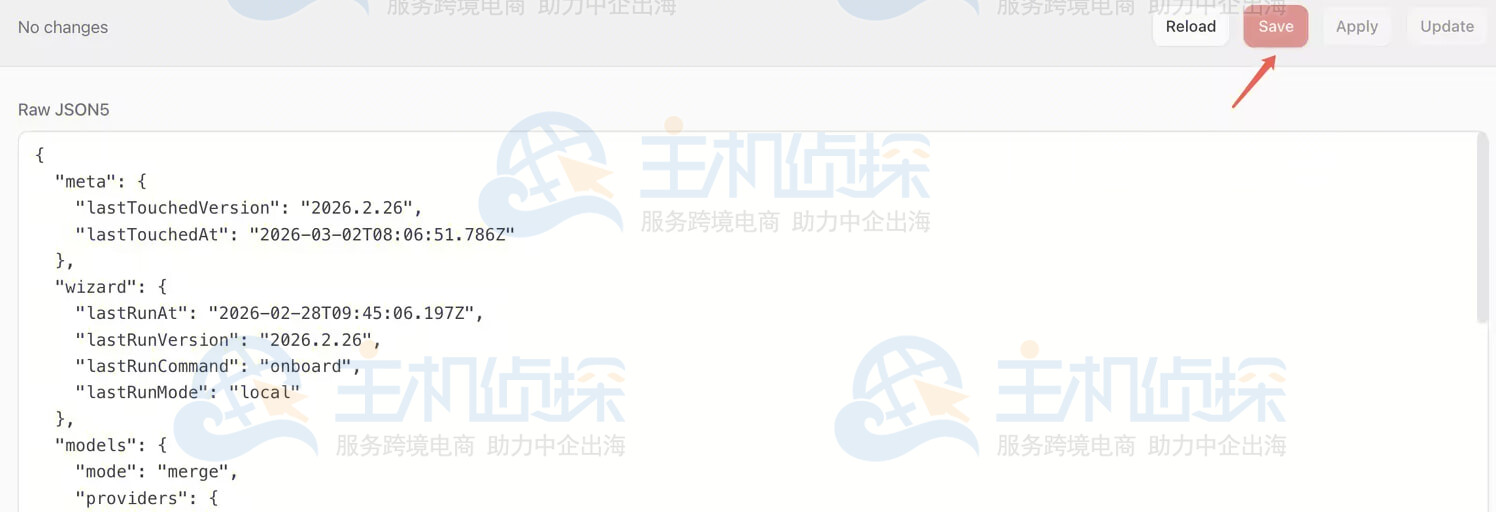
在界面上单击Save保存配置,保存完成后,单击Update使配置生效。
3、使用OpenClaw
OpenClaw支持通过WebUI和TUI的形式进行交互使用。
WebUI:
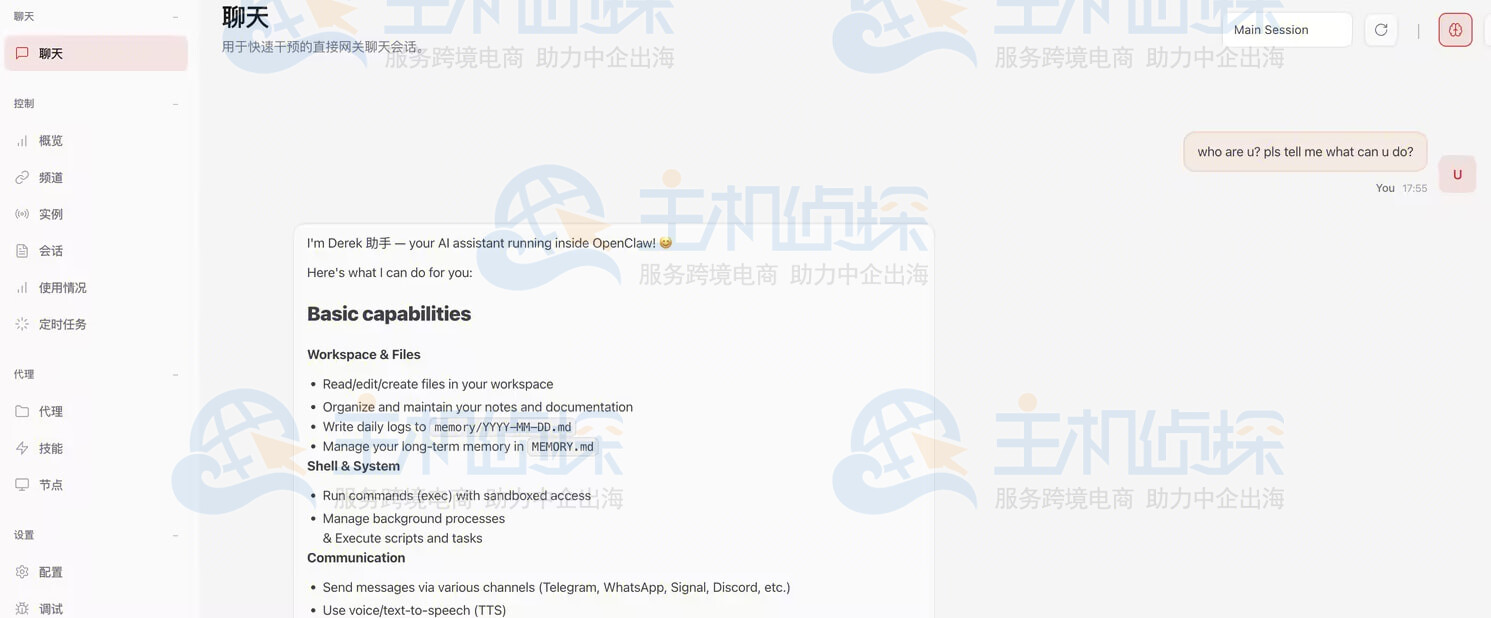
用户可以通过openclaw dashboard命令打开WebUI,单击WebUI左侧的聊天,即可进行交互。
TUI:
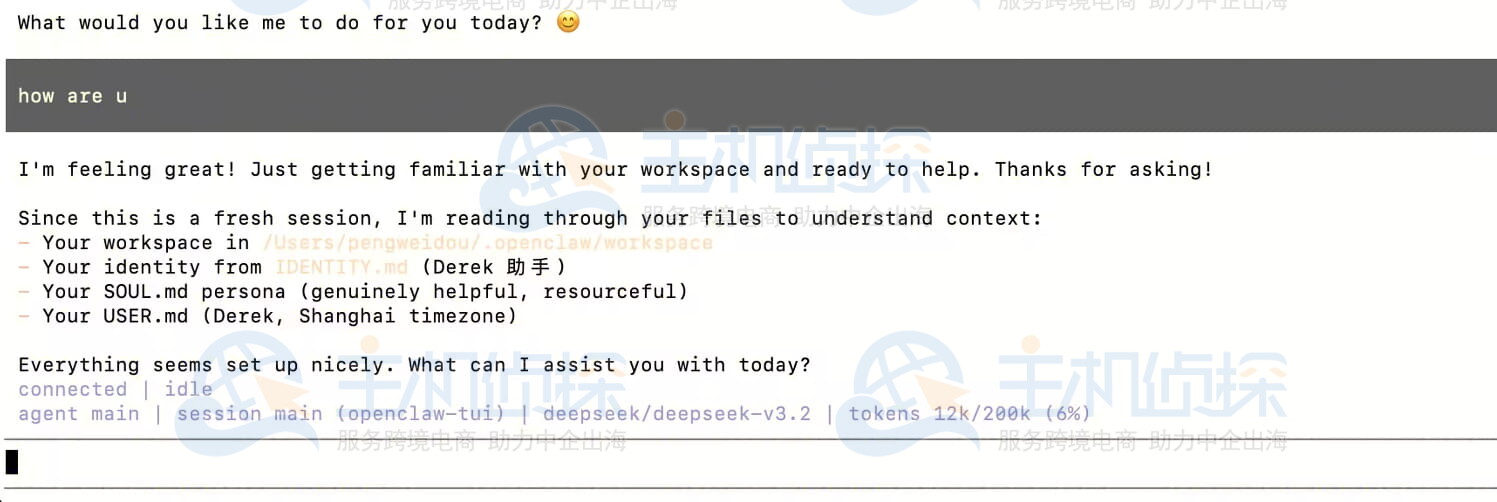
用户可以通过openclaw tui命令打开TUI进行交互。
相关推荐:
《2026年国内主流AI模型Coding Plan价格、功能盘点》
《UCloud优云智算Coding Plan购买及使用指南》
(本文由美国主机侦探原创,转载请注明出处“美国主机侦探”和原文地址!)

微信扫码加好友进群
主机优惠码及时掌握

QQ群号:938255063
主机优惠发布与交流